One of our client teams was struggling with the increased data modeling complexity coming alongside a continuously growing DBT model base. Requirements were becoming harder to collect properly from the get-go, because of the high interconnectedness of models (network effect). PR review was becoming harder. Alignment was often inexact and had to lead to rework.
Tooling exists to cover data flow (lineage) diagrams — the DBT graph is a great source for that, and extensions like DBT Power User or … facilitate it. DBT Cloud always had a model-dependency graph, and recently got also column-dependency graph in Explore. Tools like SqlDBM exist to forward- & reverse-engineer databases, but they are not made to also work natively with DBT yet we wanted DBT to remain our north star.
We were still looking for an ERD, not a data flow diagram tool. And we wanted to onboard it in our process at design-time as well as at documentation-time.
So we had to build our own simple but effective tool based on open-source Mermaid.js. Here is our journey and what we made out of it!
We want our diagramming tooling to be:
- based on an open-source framework, because we wanted to be able to freely adapt it and extend it to our needs
- built around a markdown format at its’ core (that can be modified, version-controlled and diffed 🚨)
- having a sole focus on ER diagrams as output artifacts — we didn’t care about data flows, class diagrams or others
- focused on reuse and value — instead of focusing on UI rendering (see this blog post from Vertabelo on the complexities of that), we rather wanted to spend our energy on the specificities of our models, their interconnectedness and how to best frame the diagrams in order to be useful and relevant
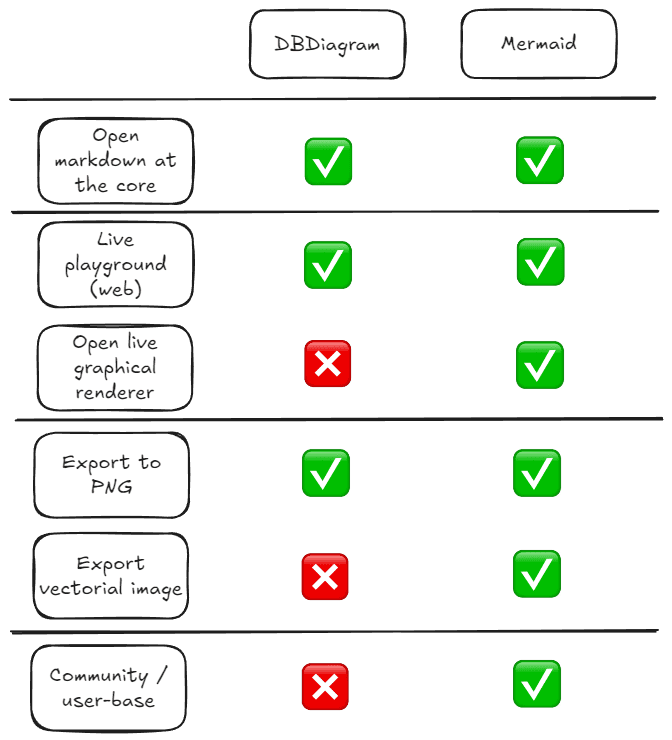
We knew from the start that we didn’t want to build the ER rendering part, thus we looked for something openly available. The following tools grabbed our attention in this space:
From a feature-parity perspective, both tools supported a markdown language at the core and provided the tooling to export the diagrams (either as PNG image, as vectorial SVG or as PDF document).
Mermaid has a ➕ for us thanks to it’s established community, being around for way longer. And it got another ➕ for the open rendering tool (Mermaid.js) which we could integrate in our data portal in the future to enable live interactions with the data model for our consumers.
This is what we take away regarding what we want and what we don’t want when extracting DBT into Mermaid markdown, design-wise:
- to extract the data model (entities and relations) from the DBT code itself, as opposed to reverse-engineering the target database; this allows us maximum flexibility and reinforces a single source or truth for the data model — the DBT codebase
- in case we have multiple transformation layers (i.e. base -> intermediate -> mart, or bronze -> silver -> gold like in medallion architecture), we want to extract an ERD from one layer only, as opposed to cross-layer; this is because we are centered on obtaining an ERD, not a data flow diagram (that is well covered by DBT lineage or equivalent tools)
- we care about entities (tables), fields (columns), primary keys and foreign keys; if we are to prioritize, entities and foreign keys are crucial for building an ERD, while fields and primary keys are nice-to-have’s
- we want the build parametrizable scripts, ready to be consumed by CICD and integrated in development workflows (in addition to running for one-off needs)
As the number of models can grow extremely large (even within a single layer), in our experience it’s critical to also add a mechanism to limit the number of models to include in an extract. I envision the following use cases, all revolving around model selection:
- including a specific (explicit) subset of models
- starting from one (or more) models
- same as above, but in addition to that, navigating relationships up to X layers of depth in order to include related models
After model selection is completed, all the corresponding relationships should be included too. By “corresponding relationships” I mean all those in which both “ends” of the relationship connect to the selected models (thus excluding all relationships which connect the selected models to any other models which were not selected).
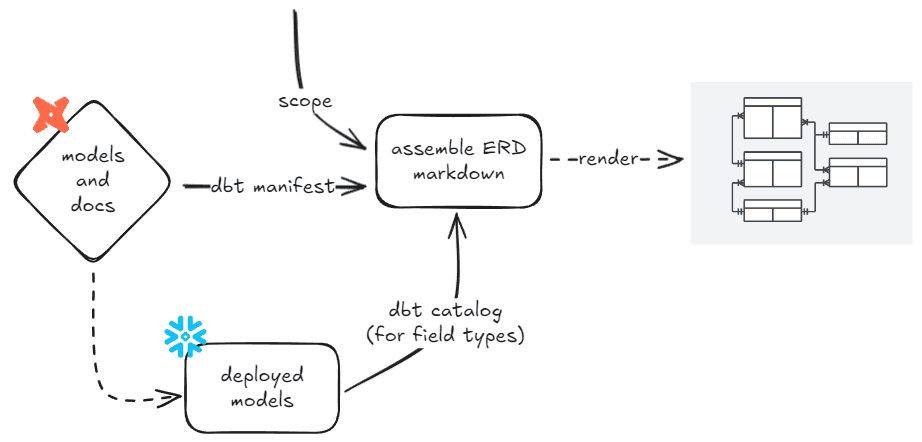
Everything up to this point can be consumed from the DBT manifest.
If you want to expose field types on your diagrams, you might need to consume the DBT catalog, too (which involve a loop with the target database). Depending on how you use DBT — more specifically, on whether you manage field data types in YML or not — you might or might not have access to field types in your manifest.
The move nowadays is to be more explicit about declaring fields types in our transformation pipelines (see contracts in DBT 1.8+), thus you might already be set up for this!
Code-wise, we stick to Python. Maybe we build a CLI tool out of it one day.
What we ultimately have to implement is metadata transformation. If you look carefully, you will realize a lot of analogies with data transformation. Here are the steps:
- we start from the DBT manifest/catalog (let’s call this the ‘raw layer’)
- we preprocess the data — extract nodes, extract PKs (in our case, modeled using
dbt_constraints.primary_key, but in your case it might be different), extract FKs (dbt_constraints.foreign_key), deduplicate FKs (because the manifest has each FK constraints modeled twice, once for the inbound part of the relationship and once for the outbound), we do model selection (see Solution design above) and then we filter relationships too
- we assemble the Mermaid markdown code
Here is the logic for the last step above:
[...]
# create target folder, if not existing
os.makedirs(os.path.dirname(target_erd_filename), exist_ok=True)

with open(target_erd_filename, "w") as target_erd_file:
    # initialize Mermaid markdown file
    target_erd_file.write('erDiagram\n')

    for scope_model_name in model_scopes:
        manifest_model = repo_manifest_models[
            f"model.{dbt_project_name}.{scope_model_name}"
        ]

        outbound_fks = [
            _
            for _ in cross_model_relationships
            if _["depends_on"]["nodes"][1] == manifest_model["_fq_name"]
                and _["refs"][0]["name"] in model_scopes
        ]

        all_fk_columns = set() # all outbound FK columns of the current model
        prepared_fk_markdown = [] # to be written to file after the models

        # prepare relationships (in markdown format)
        for fk in outbound_fks:
            to_model = repo_manifest_models[fk["depends_on"]["nodes"][0]]

            fk_columns = [
                fk["test_metadata"]["kwargs"]["column_name"]
            ] if "column_name" in fk["test_metadata"]["kwargs"]
            else fk["test_metadata"]["kwargs"]["fk_column_names"]

            prepared_fk_markdown.append(
                f"\t{manifest_model['_markdown_model_name']} " + \
                    "one to zero or more {to_model['_markdown_model_name']} " + \
                    ": \"({','.join(fk_columns)})\"\n"
            )
            all_fk_columns.update(fk_columns)

        # print models (tables or views) to markdown
        target_erd_file.write(f"\t{manifest_model['_markdown_model_name']} {start_accolade}\n")
        #model description not supported in Mermaid

        for col in manifest_model["columns"]:
            name, dtype, description = col["name"], col["dtype"].lower(), col["description"]

            col_flags = []
            if col['is_pk']:
                col_flags.append('PK')

            if col['name'] in all_fk_columns:
                col_flags.append('FK')

            col_flags_string = (
                ' ' + ','.join(col_flags)
            ) if len(col_flags)
            else ''

            target_erd_file.write(f"\t\t{dtype} {name}{col_flags_string}\n")

        target_erd_file.write(f"\t{end_accolade}\n")

        # print relationships to markdown
        for _ in prepared_fk_markdown:
            target_erd_file.write(_)
The documentation of the script says it all:
This script is used to extract a Mermaid markdown for ERD diagram
out of DBT metadata. It can be run on the DBT project on any branch,
including a feature branch that is checked out of dev.

There are multiple way to define the coverage of the ERD:
1/ starting from a list of specific models 'starting_models' and
    navigating links laterally up to 'max_depth', or
2/ for a specific set of models (filtered by model name with
    'starting_model_filter') and the links between them, or
3/ globally (neither 'starting_models' nor 'starting_models_filter')
    provided.

[PREREQUISITES (in the target DBT project)]
- dbt compile
- dbt docs generate
[Sample usage - global] python extract.py -e dev"
[Sample usage - list  ] python extract.py -e dev -m vendor_user -d 3"
[Sample usage - match ] python extract.py -e dev -mf ".vendor_"
Down below is one of the first practical cases for which we prepared to generate an ERD. We started by first extracting the Mermaid markdown:
erDiagram
    VENDOR {
        int vendor_id PK
        string name
        string contact_email
        string phone_number
        date registration_date
    }
    PRODUCT_CATEGORY {
        int category_id PK
        string name
        string description
        string parent_category_id
    }
    PRODUCT {
        int product_id PK
        int vendor_id FK
        int category_id FK
        string name
        decimal base_price
        string description
        string sku
    }
    LISTING {
        int listing_id PK
        int product_id FK
        int user_id FK
        decimal sale_price
        int quantity
        date listing_date
        string condition
    }
    USER {
        int user_id PK
        string username
        string email
        string full_name
        date registration_date
    }
    VENDOR ||--o{ PRODUCT : "sells"
    PRODUCT_CATEGORY ||--o{ PRODUCT : "contains"
    PRODUCT ||--o{ LISTING : "has"
    USER ||--o{ LISTING : "creates"
And just one step further, here is the ERD That we got:

Pretty practical and handsome, out of the box!
- extract model out of draft DBT models (in a feature branch) and share it with the team for brainstorming / review
- same as in #1, but share it with your stakeholders for validation
- following #2, ask your stakeholders to provide feedback by suggesting missing fields, models or relationships directly in a pre-filled Mermaid UI (either in the public cloud, or hosted in your data portal using MermaidJS)
- following #3, integrate the feedback of your stakeholders into the DBT models (manually for now) and regenerate the diagram to reconfirm the correct implementation
- extract all the entities from a business (sub)domain and post it on your data portal as documentation; 🚨bonus point — do this with CICD whenever a PR is merged that changes any models in that domain
This vision (of integrating ERD in the development process of an analytics engineering team) opens up new perspectives and modes of collaboration. What we especially like about it is the capacity to lower the boundaries between business and data — a paradigm shift that we need so much to make data work for business.Also published on Medium